


Hello All 👋,
I wanted to quickly mention how the application works. Both C# edition and Python edition work the same way. It uses Fernet Encryption which is an advanced encryption method used to encrypt strings of data. It requires a key in order to encrypt data. However, since we want the user to enter their own master password, we do not generate a key, but we hash the password with a salt in order to generate a key.
The salt is stored in a file called preference.en as a dictionary of a JSON. It also contains a hash of the password so that we can verify that the password entered for login is correct. All hashing is done with SHA256.
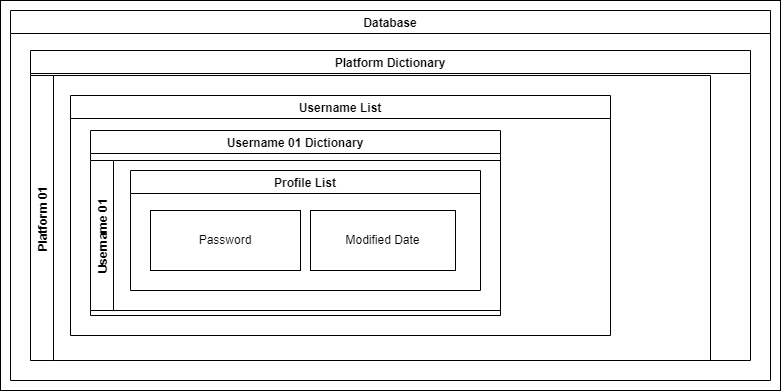
A separate database.en file stores the passwords. It follows a structure as follows:
In order to decrypt it, we follow the following procedure:
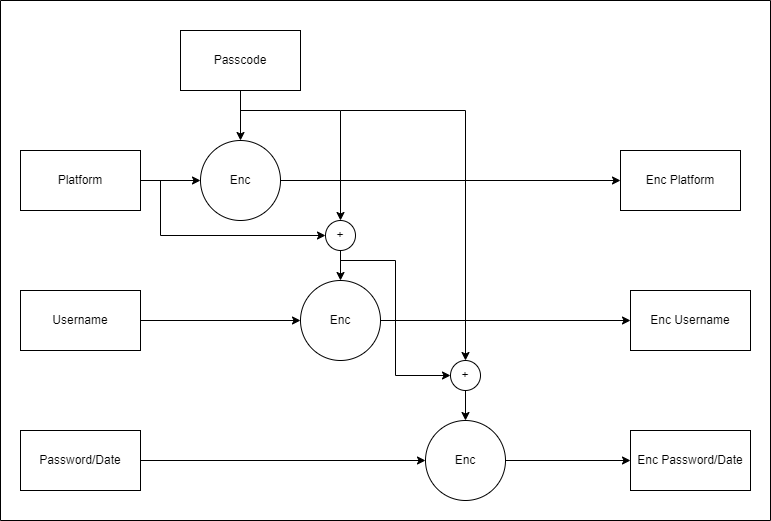
Regardless of whether C# or Python, the setup goes as above. Therefore data from one edition is cross compatible with the other.
For the Fernet encryption, in Python edition the Cryptgraphy.IO library is used. On the C# application, this is done using Fernet.net library by thangchung.
Cheers 🎉
External Links
About the author
I'm a dedicated software engineer with a passion for bringing hardware and software together to create robust and efficient solutions. I thrive on optimizing performance, managing power consumption, and ensuring the reliability of devices from concept to deployment.
🦊
Comments
Join the discussionNo comments yet. Be the first to comment.
🔐 Project Muragala
Muragala is a password manager designed to make managing passwords easy and secure. My goal is to make it a secure and reliable password manager available in the public domain for everyone to use.


